WhatsApp automation with AI and human handoff
Best WhatsApp Automation Tool
for Sales Teams
For sales teams, the best WhatsApp automation tool is not the one that tries to close everything with AI. It is the one that replies quickly, qualifies the lead, captures useful context, updates your CRM or sheet, and hands the conversation to a person before trust is lost. Use this checklist to compare tools and implementation partners before you buy or build.
What is the best WhatsApp automation setup for a sales team?
The best setup combines fast AI replies with clear human-agent handoff. It should qualify only what sales needs, preserve the conversation context, update the CRM, alert the right rep, and continue approved follow-up when the lead goes quiet.
AI-only automation
- Works for FAQs and simple routing.
- Risks losing trust on pricing, objections, or custom requests.
- Often leaves sales without a useful summary.
AI plus human handoff
- Qualifies and routes routine conversations.
- Hands high-intent or sensitive chats to a rep.
- Preserves context, ownership, and follow-up.
Recommended path
Connect this checklist to the right system
Use this page as the broad comparison guide. For sales-team-specific handoff rules, use the dedicated workflow page.
Worked example
Test handoff before choosing a tool
Illustrative workflow to review with your team; not a client result.
From request to action
- TriggerYou are comparing an inbox, automation platform or CRM connection.
- Required informationRun the same sample conversation in each option. Inspect the handoff trigger, transcript visibility, assignment rule and human override.
- Rule and ownerCheck whether automation pauses while the person replies, and whether unresolved handoffs appear in a report or queue.
Example record
Evaluation record: trigger works; transcript visible; owner assigned; bot paused; human reply possible; closure recorded.
Score the observed behavior; a feature list alone does not prove that a handoff works.
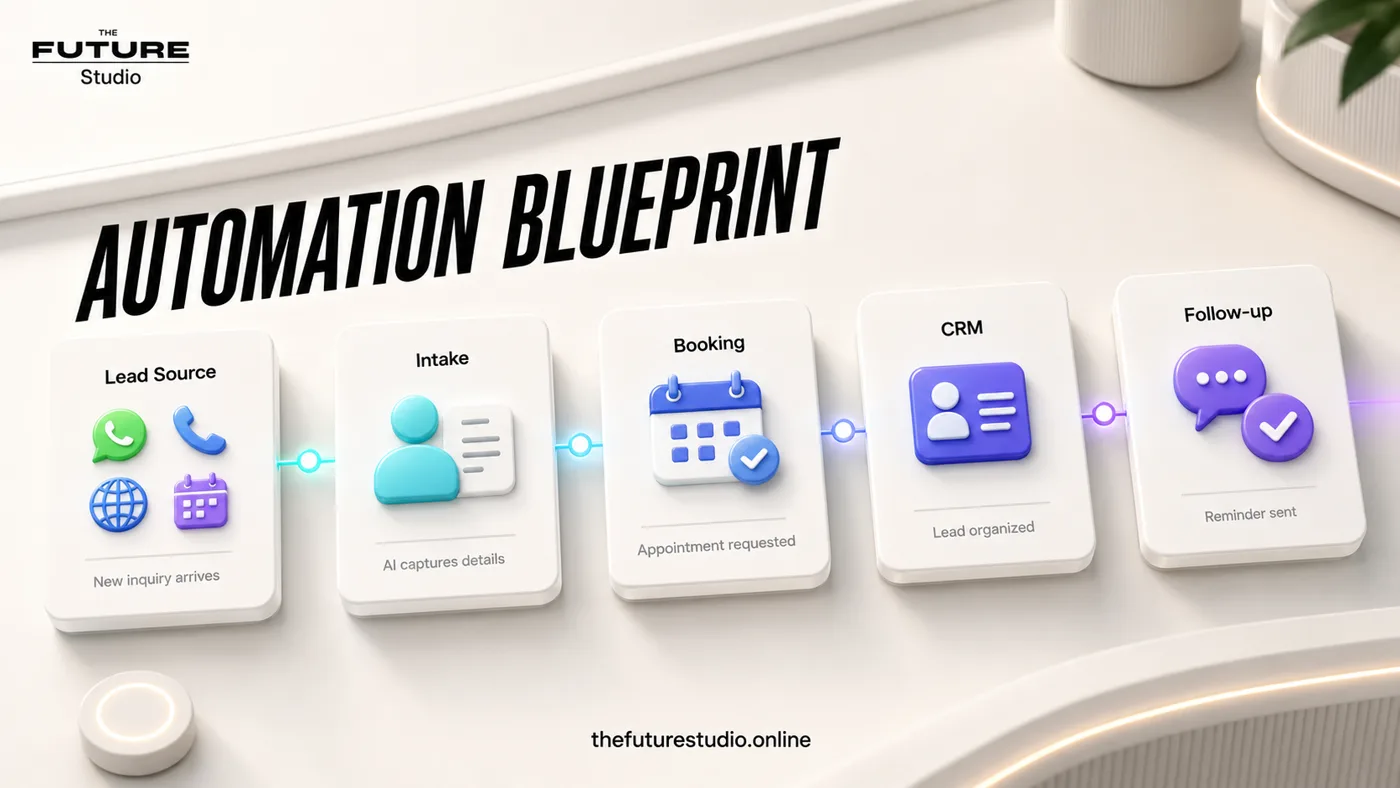
Compare the system, not just the chatbot
Review routing, data capture, handoff, follow-up, and reporting before choosing a tool.
Narrow task
What to compare before choosing WhatsApp automation
Most businesses do not only need an auto-reply. They need a workflow that protects speed, context, and trust. The first response should happen quickly, but the system also has to collect enough information to decide what should happen next.
Good WhatsApp automation can ask the right qualifying questions, identify the product or service interest, capture contact details, tag the lead source, and route the conversation when a person should take over.
The useful comparison is not chatbot versus chatbot. Compare AI qualification, handoff logic, CRM fit, reporting, follow-up, template support, and how much work is needed to launch the first reliable workflow.
Best fit
This kind of system is a strong fit for sales teams, clinics, agencies, real estate teams, hospitality businesses, and service companies where WhatsApp is already a serious lead channel.
Not a good fit
It is not a good fit if you only need a simple FAQ menu, if nobody on the team will review handoffs, or if the business wants AI to make sensitive medical, legal, financial, or pricing decisions without approval.
Handoff rules
When AI should stop and a human agent should take over
Human handoff should happen when the lead asks for pricing that requires judgment, wants a custom quote, shows strong buying intent, requests a call, sends a complaint, asks something outside the approved script, or needs reassurance before moving forward.
The handoff should include a short summary: who the lead is, what they asked, what the AI already answered, what they want next, and which channel they came from. Without that context, the sales rep still has to reread the whole chat.
The goal is not to hide the human team behind automation. The goal is to make sure the human team receives cleaner, warmer, better-timed conversations.
Tool criteria
How to choose the right WhatsApp automation tool
Look for support for WhatsApp Business, approved templates where needed, AI-assisted qualification, CRM or spreadsheet updates, team notifications, escalation rules, multilingual scripts, and reporting.
Avoid tools that only promise generic chatbot answers. Sales teams need conversation design, handoff logic, data capture, and follow-up workflows that match how the business actually sells.
If the company sells internationally, the workflow should also support different languages, time zones, and routing rules without making the brand look local-only.
Eight-point scorecard
Score the workflow before buying the software
1. Official WhatsApp connection: Can it use the business's approved number and templates? 2. Shared inbox: Can the correct rep see and own the conversation? 3. Qualification: Can questions change by service, source or language?
4. Handoff: Does the rep receive a useful summary and alert? 5. CRM: Can it create or update the right record without duplicates? 6. Follow-up: Can approved reminders stop when a person replies?
7. Reporting: Can the team see response time, handoffs, booked calls and quiet leads? 8. Governance: Are scripts, permissions, fallback rules and message history reviewable?
Buying decision
Choose a platform, an implementation partner, or both
A platform provides the inbox, API connection and workflow features. It does not automatically decide what your team should ask, when a rep should take over, which CRM fields matter or how follow-up should stop.
A custom implementation makes sense when routing, languages, booking logic, reporting or integrations are specific to the business. A simpler configured platform may be enough when the team mainly needs a shared inbox, approved templates and basic assignment.
Before signing a contract, run five real conversations: a new lead, a pricing objection, a custom request, an unanswered follow-up and a complaint. The best option is the one that keeps context and ownership intact across all five.
Build path
The practical first workflow to launch
Start with a narrow workflow: new WhatsApp lead, fast greeting, source capture, interest qualification, budget or urgency question if appropriate, call or demo offer, CRM update, and human handoff for qualified leads.
After that works, add follow-up for leads that do not reply, reminders for booked calls, routing by product or territory, and reporting for response time and conversion.
This keeps the first build useful without overcomplicating the sales process.
FAQ
Common questions
What should a WhatsApp automation buyer checklist include?
It should compare AI qualification, human handoff, CRM updates, reporting, WhatsApp Business template support, follow-up workflows, multilingual handling, and implementation support.
Should WhatsApp automation replace human sales agents?
No. It should handle first response, qualification, routing, reminders, and summaries so human agents can focus on serious or sensitive conversations.
What is human handoff in WhatsApp automation?
Human handoff is the point where the AI sends the conversation and a summary to a sales rep, support agent, receptionist, or manager.
Can WhatsApp automation work for international businesses?
Yes. The workflow can support international sales if the scripts, time zones, CRM fields, language handling, and handoff rules are designed correctly.
Related pages
Explore WhatsApp and automation systems
Next step
Map the first workflow that needs to work
Book a free AI systems demo with The Future Studio. We will map the workflow, the boundaries, and the smallest system that can create real impact.