ai automation for dental clinics
AI Automation for Dental Clinics
AI automation for dental clinics helps reception teams handle new patient requests, cleanings, cosmetic consults, missed calls, WhatsApp questions, reminders, reschedules, and follow-up. It should not give dental advice or replace clinical judgment. The useful role is administrative: collect the right details, route the request, and give staff a clear summary before they respond.
What should a dental clinic automate first?
The best first dental automation is usually one high-volume administrative path: missed-call recovery, new-patient appointment requests, hygiene reminders or reschedules. The AI should capture the request and create a staff-ready next step, not diagnose symptoms, promise treatment or estimate a clinical outcome.
Automate
- Contact details, visit type and preferred time.
- Approved FAQs, directions and booking links.
- Reminders, confirmations and staff summaries.
Send to staff
- Pain, swelling, trauma or urgent symptoms.
- Treatment recommendations or clinical suitability.
- Complex insurance, finance or complaint decisions.
Dental front desk route
Start with the request that creates the most admin
Choose the entry point that needs the clearest handoff, whether it is a missed call, WhatsApp question, website form, consult request, or reschedule.
Worked example
From dental enquiry to staff confirmation
Illustrative workflow to review with your team; not a client result.
From request to action
- TriggerA new patient asks about a cleaning or cosmetic consultation.
- Required informationCapture visit type, preferred time, language and contact preference. Offer the approved administrative preparation information.
- Rule and ownerTreatment or symptom questions go to clinical staff. The booking becomes confirmed only when the calendar or authorised staff confirms the slot.
Example record
Dental request: cleaning consultation; time: requested; language: chosen by patient; status: awaiting staff confirmation; owner: reception.
Treatment suitability, diagnosis and final clinical recommendations stay with the dental team.
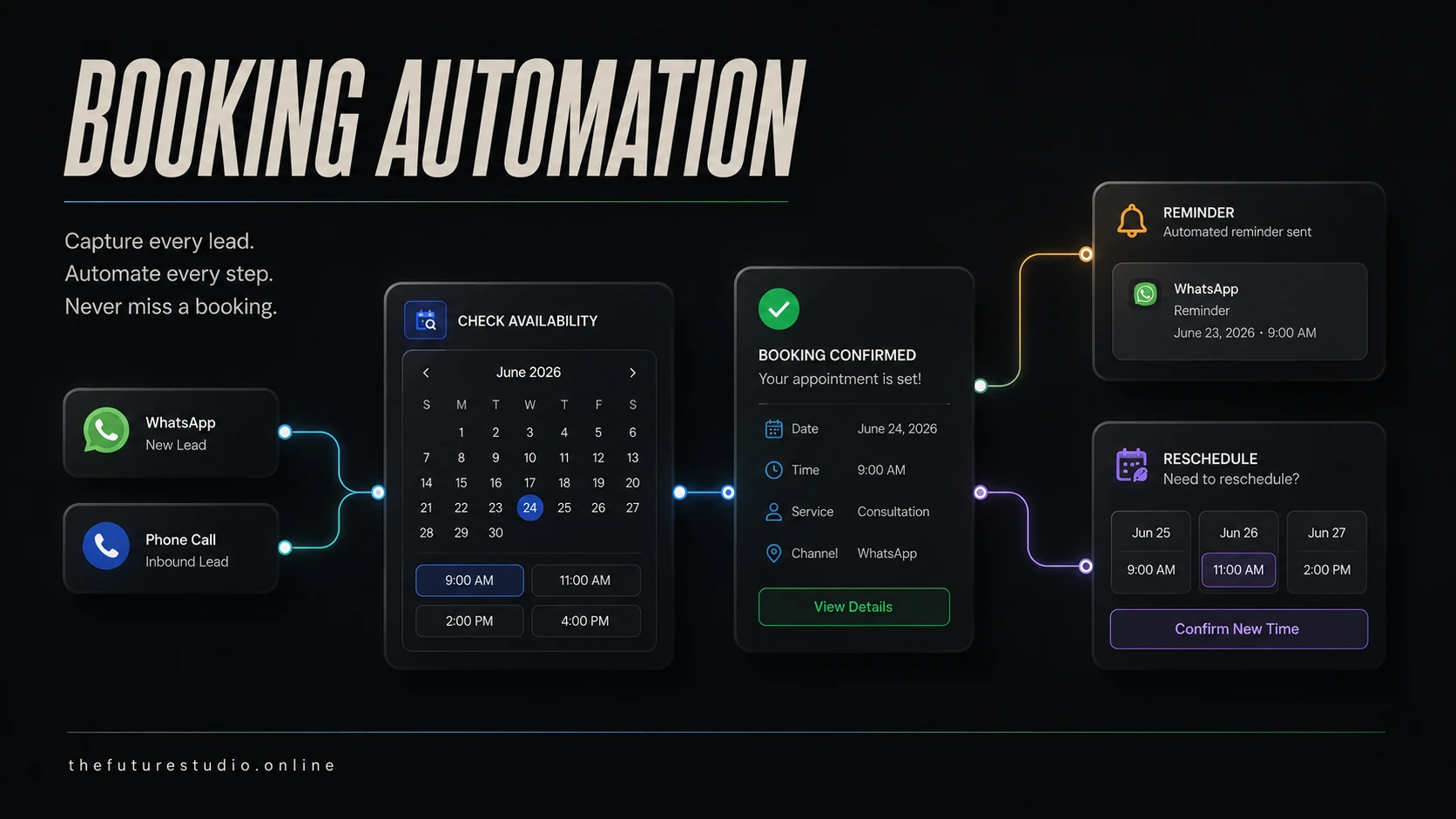
Make the front desk handoff clearer
A dental workflow can separate cleanings, consults, reschedules, insurance questions, and symptom-related messages before a staff member takes over.
Use cases
Front desk workflows worth mapping
Dental offices can use AI to capture new patient requests, cleaning appointments, hygiene recalls, whitening consults, implant consult requests, insurance questions, and directions.
The system can ask approved intake questions, send the right booking path, collect preferred times, and route urgent or unclear dental concerns to staff.
It can also support reminders, reschedules, missed-call follow-up, WhatsApp replies, and reporting so the clinic can see where inquiries are coming from.
Boundaries
Keep clinical and financial judgment with staff
Dental AI should not diagnose pain, recommend treatment, handle emergencies on its own, or promise availability, pricing, or outcomes outside approved clinic rules.
Urgent pain, swelling, bleeding, trauma, post-procedure concerns, and unclear symptoms should follow the clinic approved human escalation process.
Insurance and payment questions should use approved language and route exceptions to staff.
Panama and bilingual workflows
Make bilingual patient intake easier to route
Dental clinics in Panama often receive inquiries through WhatsApp, phone calls, Instagram, Google searches, referrals, and website forms.
A bilingual AI workflow can help English and Spanish speakers reach the right next step while the clinic keeps control over scheduling rules and sensitive decisions.
The Future Studio maps the first dental front desk workflow before choosing tools, so the automation fits how the clinic actually works.
Build path
Start with one measurable dental workflow
Choose one workflow with visible volume and a clear owner, such as missed-call recovery, cleaning recalls, consult requests or reschedules.
Define approved questions, calendar rules, staff handoff, data fields and test scenarios before adding more channels.
Measure response time, completed appointment requests, recovered missed calls, confirmation rate and the percentage of conversations that still require staff correction.
Operational example
A missed dental call should become a staff-ready request
When a call is missed, the workflow can send an approved message asking whether the person is a new or returning patient, what type of appointment they are requesting, their preferred time and the best callback route.
If the person mentions pain, swelling, trauma or another symptom, the automation stops the normal booking questions and alerts staff according to the clinic's urgent-message policy.
The front desk receives the original source, captured details, urgency label and next action. This is more useful than a generic transcript and easier to measure than a broad AI receptionist launch.
FAQ
Questions about dental front desk automation
Which dental requests can be routed first?
A clinic can start with new-patient requests, cleanings, consults, reschedules, insurance questions, and directions, using approved fields before routing unclear or urgent messages to staff.
Can AI answer dental symptom questions?
No. It should avoid diagnosis and treatment advice. Pain, swelling, bleeding, trauma, post-procedure concerns, and unclear symptoms should follow the clinic's approved human escalation process.
How should dental calls and WhatsApp fit together?
Both channels can feed one intake queue that preserves the request source, patient status, appointment type, preferred times, and the next staff action.
What does staff need before booking?
The practice can define the minimum administrative fields, such as name, contact method, request type, new or existing patient status, and preferred time. Scheduling and clinical decisions remain with staff.
Related pages
Explore related systems and industries
Support guides
Read the practical automation guides
Next step
Map the first workflow before you build
Book a free AI systems demo with The Future Studio. We will map where requests arrive, what staff need, and which first automation can reduce admin pressure without taking control away from people.